
Sign in to your AI
ShipPress does not sell AI, and it never sees or keeps your password. You need your own plan with the tool you pick.
-
Open Your AI
Open Settings, then Your AI.
-
Choose the engine
Default engine for new Workers lists Claude Code, Grok Build, Codex and Antigravity. The shorter settings view calls the same choice New Workers use. Workers you already have keep their AI. Claude Code is from Anthropic and uses your Claude account. Grok Build is from xAI and uses your Grok account. Codex is from OpenAI and uses your ChatGPT account or an OpenAI API key. Antigravity is from Google and uses your Google account or a Gemini API key.
-
Sign in, then check again
If a card says Not signed in, follow the steps on that card, then click Check again. They are not the same. Claude Code: paste claude in your own terminal. Grok Build: run grok login --device-auth. Codex: click Sign in with ChatGPT, or use an OpenAI API key in your own terminal. Antigravity: run agy, then sign in with Google in the browser. The picture shows the steps for the engine that is selected.
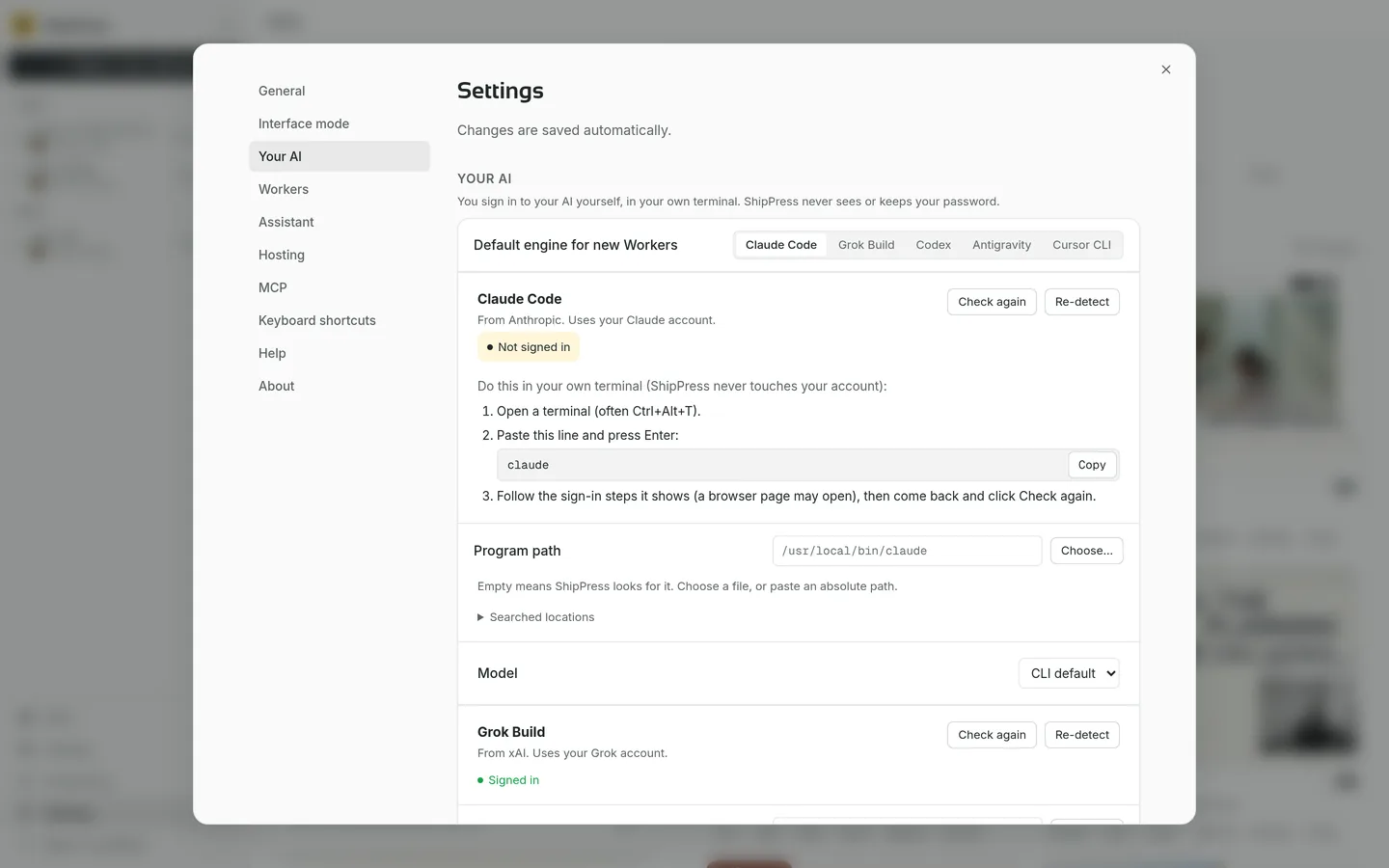
Your AI. Pick the default engine, follow that card’s sign-in steps, then Check again.